Table Actions
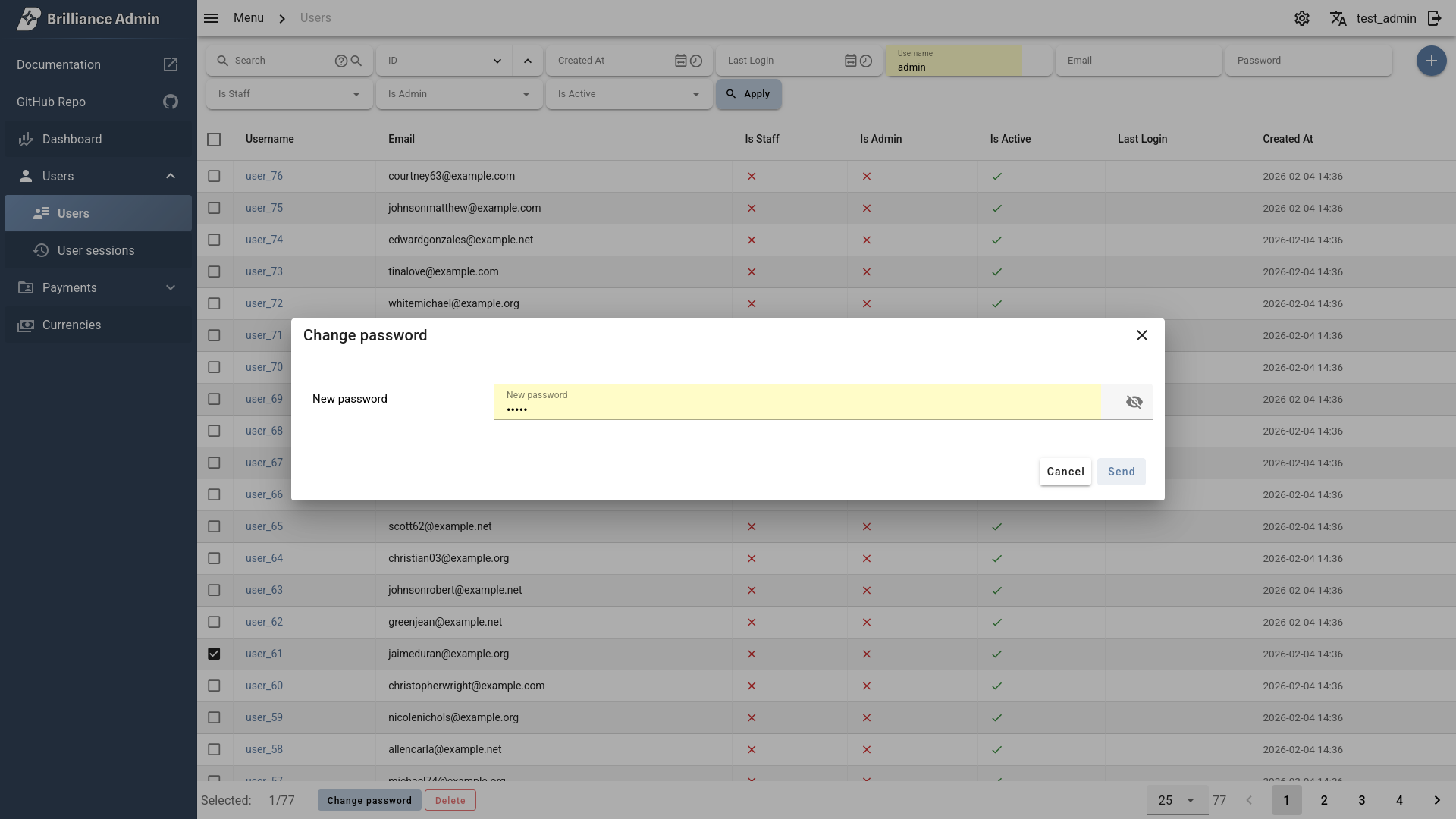
Actions are custom operations that can be performed on selected table rows. Decorate an async method with @admin_action to register it on any CategoryTable.
Basic action
from brilliance_admin.schema.table.admin_action import admin_action, ActionData, ActionResult


class UsersTable(schema.CategoryTable):
    ...

    @admin_action(
        title='Deactivate',
        description='Deactivate selected users',
        confirmation_text='Are you sure?',
    )
    async def deactivate(self, action_data: ActionData):
        for pk in action_data.pks:
            await deactivate_user(pk)

        return ActionResult('Users deactivated')
@admin_action parameters
@admin_action parameters
| Parameter | Description |
|---|---|
title | Action button label |
description | Tooltip or description text |
confirmation_text | Confirmation dialog message before execution |
form_schema | FieldsSchema for an input form shown before execution |
allow_empty_selection | Allow running without any selected rows (default False) |
base_color | Vuetify color (e.g. 'red-lighten-2') |
icon | MDI icon name (e.g. 'mdi-delete') Icons Database |
variant | Vuetify button variant: 'elevated', 'flat', 'tonal', 'outlined', 'text', 'plain' |
ActionData
The action method receives ActionData with context about the current table state.
| Parameter | Description |
|---|---|
pks | List of selected row primary keys |
form_data | Dict of submitted form values (if form_schema is set) |
search | Current search query string |
filters | Dict of currently applied filter values |
send_to_all | True if "select all" was used instead of picking specific rows |
ActionResult
Return ActionResult to show feedback to the user.
# Short form — text converts to ActionMessage automatically
return ActionResult('Operation completed')

# With persistent message (stays on screen, does not auto-hide)
return ActionResult(persistent_message='Report generated successfully')

# Full form with ActionMessage for custom type and position
from brilliance_admin.schema.table.admin_action import ActionMessage

return ActionResult(
    message=ActionMessage(
        text='Done',
        type='success',       # 'success', 'error', 'warning', 'info'
        position='top-center',
    ),
)| Parameter | Description |
|---|---|
message | ActionMessage or string — auto-hiding notification |
persistent_message | Text that stays on screen until dismissed |
ActionMessage
| Parameter | Description |
|---|---|
text | required Message text |
type | Notification type: 'success', 'error', 'warning', 'info' (default 'success') |
position | Position on screen (default 'top-center') |
Action with form
Pass form_schema to collect input from the user before executing the action. Submitted values are available in action_data.form_data.
@admin_action(
    title='Change password',
    form_schema=schema.FieldsSchema(
        new_password=schema.StringField(label='New password', min_length=6),
    ),
)
async def change_password(self, action_data: ActionData):
    new_password = action_data.form_data['new_password']

    for pk in action_data.pks:
        await update_user_password(pk, new_password)

    return ActionResult('Password changed')
The form supports all field types from Table/FieldsSchema and validates input before submission.
Action with confirmation
Use confirmation_text to show a dialog before execution. Useful for destructive operations.
@admin_action(
    title='Delete',
    confirmation_text='Are you sure you want to delete selected items?',
    base_color='red-lighten-2',
    variant='outlined',
)
async def delete(self, action_data: ActionData):
    for pk in action_data.pks:
        await delete_item(pk)

    return ActionResult('Deleted successfully')
Action without selection
Set allow_empty_selection=True to allow running the action without selecting any rows. Useful for actions like "Create new" or "Generate report".
@admin_action(
    title='Generate report',
    allow_empty_selection=True,
)
async def generate_report(self, action_data: ActionData):
    # action_data.pks will be empty
    # action_data.filters contains current table filters
    report = await build_report(action_data.filters)

    return ActionResult(persistent_message='Report generated')
Error handling
Raise any exception inside an action to show an error message to the user. The exception text will be displayed as an error notification.
@admin_action(title='Approve')
async def approve(self, action_data: ActionData):
    if not action_data.pks:
        raise Exception('No items selected')

    await approve_items(action_data.pks)
    return ActionResult('Approved')
TIP
All string parameters (title, description, confirmation_text, field labels, messages) support TranslateText for i18n.