Tables
brilliance_admin.schema.CategoryTable
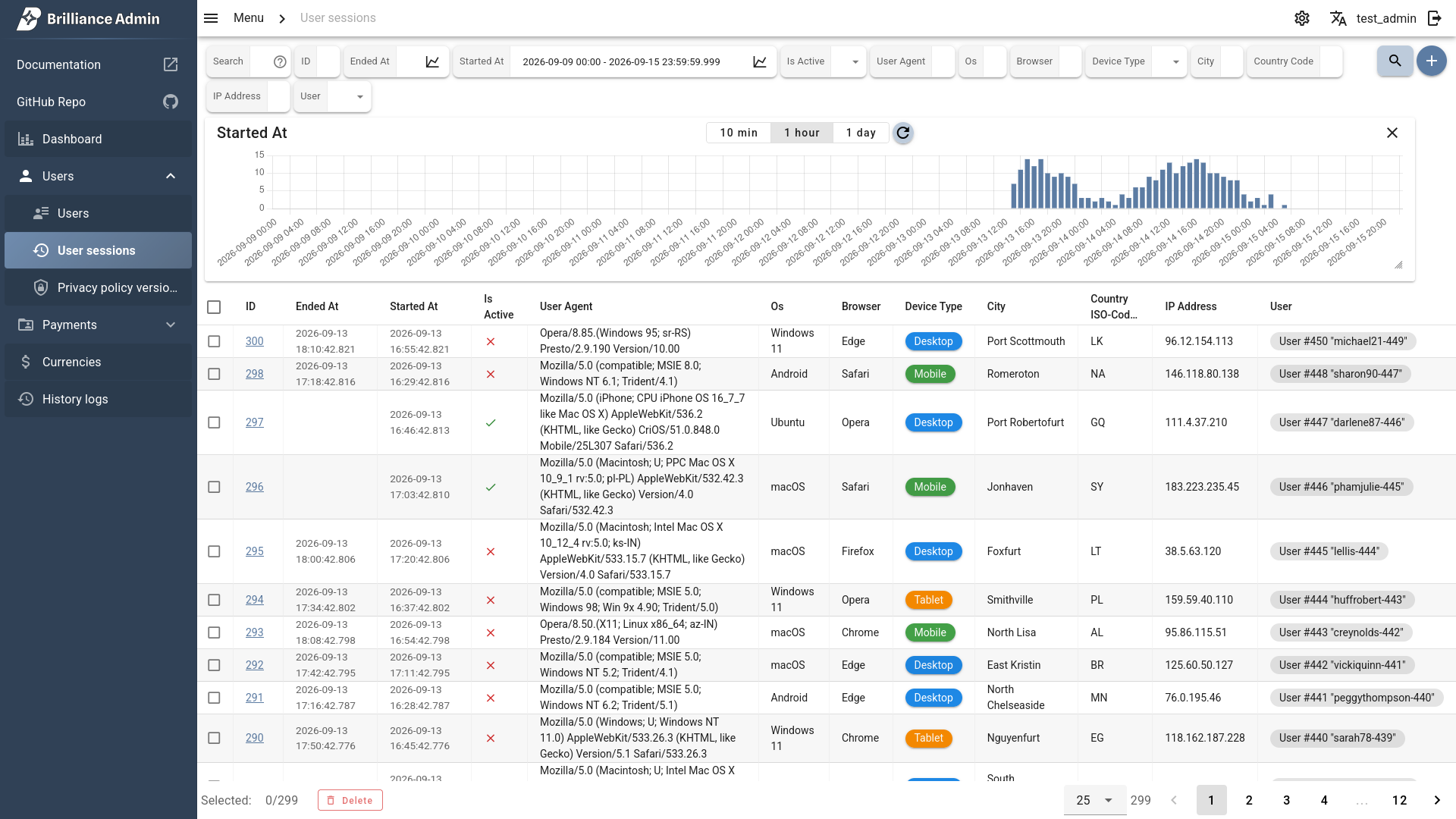
Tables display data in rows with search, filters, sorting, and row actions.
Subclass CategoryTable and implement get_list to return paginated data.
CategoryTable
from brilliance_admin import schema
from brilliance_admin.schema.table.category_table import CategoryTable
from brilliance_admin.schema.table.table_models import ListData, TableListResult


class UsersTable(schema.CategoryTable):
    slug = 'users'
    title = 'Users'
    icon = 'mdi-account-group'

    pk_name = 'id'
    search_enabled = True
    search_help = 'Search by name or email'

    ordering_fields = ['id', 'created_at']
    default_ordering = '-created_at'

    table_schema = UsersSchema()
    table_filters = UsersFiltersSchema()

    async def get_list(self, list_data: ListData, user, language_context, admin_schema) -> TableListResult:
        # fetch and return your data here
...| Parameter | Description |
|---|---|
slug required | Unique identifier |
title required | Display name in the sidebar |
icon | Material Design icon name (e.g. 'mdi-chart-bar-stacked') Icons Database |
Table Config
| Parameter | Description |
|---|---|
table_schema required | FieldsSchema defining table columns |
table_filters | FieldsSchema defining filter controls above the table |
pk_name | Primary key field name (enables detail view) |
search_enabled | Enable search input |
search_help | Placeholder/help text for the search input |
ordering_fields | List of field names available for sorting |
default_ordering | Default sort field (prefix with - for descending) |
count_provider | Optional provider for total record and page count calculation |
Count provider
count_provider accepts a CountProvider implementation. It controls total record and page count calculation.
TableOptions
Configure one table:
class UsersTable(schema.CategoryTable):
    options = schema.TableOptions(
        fixed_header=True,
        density='compact',
)| Parameter | Description |
|---|---|
fit_screen | Fit table columns into the available screen width |
density | Vuetify row density |
font_size | Table font size, for example '0.85rem' |
cell_padding | Cell padding, for example '7px 8px' |
fixed_header | Keep the table header visible while scrolling inside the table |
Configure defaults for all tables without their own options:
admin_schema = schema.AdminSchema(
    default_table_options=schema.TableOptions(
        fixed_header=True,
    ),
    # ...
)
Table-level options have priority over default_table_options.
FieldsSchema
Defines columns for the table and fields for filters or action forms.
from brilliance_admin import schema
from brilliance_admin.translations import TranslateText as _


class UsersSchema(schema.FieldsSchema):
    id = schema.IntegerField(label='ID')
    username = schema.StringField(label=_('username'))
    email = schema.StringField(label=_('email'))
    is_active = schema.BooleanField(label=_('is_active'))
    created_at = schema.DateTimeField(label=_('created_at'))

    _fields = ['id', 'username', 'email', 'is_active', 'created_at']
Available field types Table/Filters Fields.
get_list
The main method that returns paginated data. Receives ListData with pagination, search, filters and sorting parameters.
ListData
| Parameter | Description |
|---|---|
page | Current page number |
search | Search query string |
filters | Dict of applied filter values |
ordering | Current sort field |
TableListResult
Return TableListResult with rows and total count:
from brilliance_admin.schema.table.table_models import ListData, TableListResult


async def get_list(self, list_data: ListData, user, language_context, admin_schema) -> TableListResult:
    # your data fetching logic
    rows = [
        {'id': 1, 'username': 'admin', 'email': 'admin@example.com'},
        {'id': 2, 'username': 'user', 'email': 'user@example.com'},
    ]
    return TableListResult(rows=rows, total=len(rows))
CRUD
Implement optional async methods to enable create, retrieve and update operations.
class CustomTable(schema.CategoryTable):
    ...

    async def retrieve(self, pk, user, language_context, admin_schema) -> schema.RetrieveResult:
        # fetch record by pk
        return schema.RetrieveResult(data={'id': pk, 'username': 'admin'})

    async def create(self, data, user, language_context, admin_schema) -> schema.CreateResult:
        # create record from data dict
        return schema.CreateResult(pk=1)

    async def update(self, pk, data, user, language_context, admin_schema) -> schema.UpdateResult:
        # update record by pk with data dict
        return schema.UpdateResult(pk=pk)
pk_name must be set to enable retrieve. Methods are auto-detected — if defined, the UI will show corresponding buttons.
Actions
See Table Actions